Auto Eye


AutoEye 2.0

Dreamsuite 1

Reclaim Lost Color and Detail


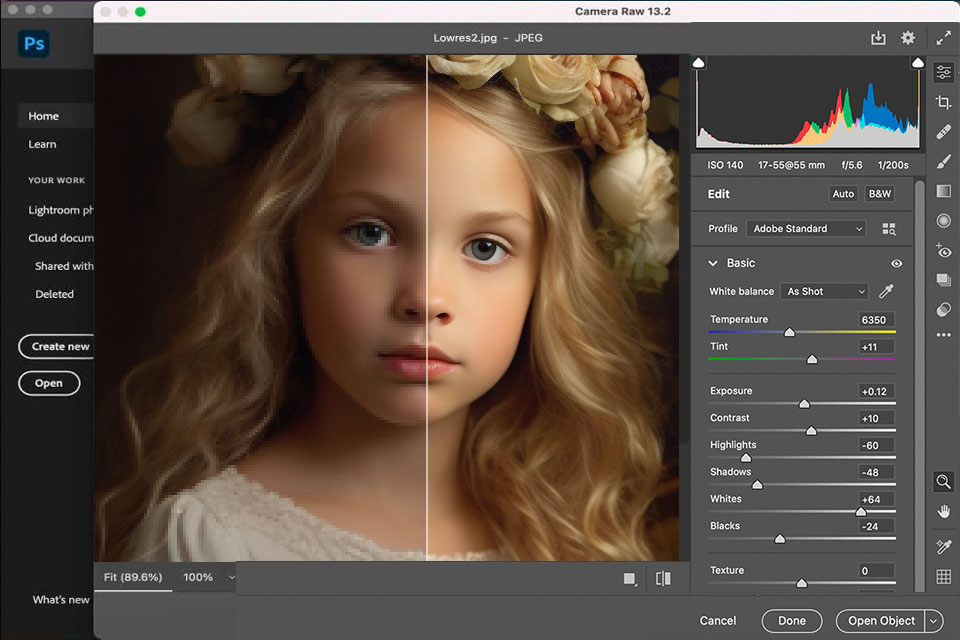
During the process of converting an image from analog to digital, a great deal of color and detail information is lost. AutoEye uses I.V.I.T, a patented Intelligent Visual Image Technology, to help it see images in a unique way and reclaim much of the lost detail and color and improve the overall appearance of an image.


Download Documentation


Document * File Size 28.8 56K ISDN DSL/Cable
1 MB 5 Min 21 Min 11 Min 1 Min / -1
4 MB 19 Min 10 Min 5 Min 5 Min / -1


* Right click on the document link and choose 'Save Target As" to download the Acrobat .pdf file to your disk. Mac users click and hold down on the link.


AutoEye 2.0

AutoEye Enhancement Controls are easy to learn and quick to use. Complex algorithms and image adjustments are performed behind the scenes so you can stay focused more on the visual and less on technique.


Unlike image editing programs, AutoEye does not make you jump from one dialog menu to another and back again trying to find the right combination and order of adjustments to perfect your image.

AutoEye

AutoEye 2.0 was created to automatically improve digital images by rebuilding color detail, sharpness and image vibrancy.

AutoEye uses a totally different set of adjustment methods than Photoshop or other image editing applications. AutoEye does not use standard curves and histograms to adjust images on a global basis within the RGB or CMYK color space. AutoEye's unique methods result in image enhancements that are easier to attain and yield a higher quality result.

Check out the AutoEye 2.0 Evaluation Guide.


  • AutoEye Gallery
  • AutoEye Demo
  • AutoEye Purchase

Purchase AutoEye 2.0 For $129

Electronic Download or Physical CD


Upgrade From AutoEye Version 1.0 - $79


AutoEye 2.0 works as both a plug-in and as a stand alone application for Windows 98/NT/2000/ME/XP/Vista or on any G3 or G4 Macintosh system running OS 9 - OS X (including leopard).


AutoEye 2.0 supports Adobe Photoshop 4.0 - CS3, Photoshop Elements 1.0 and higher, Corel Paint Shop Pro 7.0 and higher and Corel Photo Paint 9.0 and higher as well as Corel Draw 9.0 and higher.


AutoEye

AutoEye 2.0 has an easy to use feature packed interface.


Improves Images with a Single Click


Not everyone has the time to perfect images with programs like Photoshop. AutoEye is a huge timesaver as it can instantly correct and enhance images with a single click.


Improves Input and Output Quality


Regardless of your input and output workflow AutoEye can enhance your images. AutoEye can make both printed and web images sharper and more life-like.

  • Enhance under or over exposed photos
  • Enhance digital camera photos
  • Enhance and correct scans in seconds
  • Improve your photos before printing them
  • Use AutoEye to sharpen resized images
  • AutoEye works great for photo restoration
  • AutoEye creates inkjet and dyesub prints better


Avoid  
Combine Multiple Adjustments Together.

In Photoshop and other image editing applications you must manually enhance images by working with Levels, Curves, Color Balance, Unsharp Mask, Contrast, Saturation, Adjustment Layers and other controls independently of each other. As you move between these dialogs your image information changes.

 
AutoEye 2.0 Features

AutoEye 2.0 is a feature rich easy to use application and plug-in. Below you will find some of the more important product features and benefits.


Photoshop Support


Control Interupt
Control Interrupts

As you adjust controls the effect updates itself automatically. An intelligent control interrupt system allows you to interrupt the effect if it is updating itself.


Preview

Advanced Preview System

AutoEye's adjustable preview features a 1600% marquee zoom capability with built in panning support. Previews can be shown in Proxy mode so they render blazingly fast regardless of the image size


Memory Dots

Memory Dots

Click a memory dot on the interface and AutoEye 2.0 remembers your current settings. You can explore with your design ideas and come back to where you were with a single click


File Support

File Open and Save Support

AutoEye 2.0 features file loading and saving support for: .psd, .tif, .bmp, .jpg, .gif, .png file formats. Saving in Photoshop format will export the effect layers into a single transparent layer in a Photoshop native document.

Help Text

Help on Demand

AutoEye 2.0 lets you hold your mouse over a control for a few seconds and a floating window appears that contains comprehensive detailed instructions about the control.


This powerful feature gives you instant access to control information without the need to look in a manual or use a separate help system that takes you away from the task at hand. The AutoEye tool tips are fast and efficient to use.


Customize the Interface to Your Liking

Choose from over a dozen interface flavors and desktop textures and your interface will instantly change to match your preferences.


AutoEye General Control Features

The following are descriptions of what some of the controls in AutoEye perform.


Color Correction

Corrects cast colors found in many digital files, and ensures that the color balance in the image is maintained consistently throughout the entire range of colors.


Contrast

Adjusts an images highlights, shadows, and mid-tones for sharper tonal variance. Lifeless images will instantly jump off the page with richer contrast that guards against burning highlights or blowing out details in lighter areas of the image.


rebuilds Detail

Enhances images to bring back lost detail and to sharpen the quality of the visual to closer match the original non-digital image.


Saturation

Increases the vibrancy and enriches the color gamut of the digital file through a unique blending method. Saturation controls are subtle and work in combination with other color correction controls to give a more natural saturation to the colors in the image.


Brightness

Selectively adjusts the relative lightness or darkness values within an image. Photos shot in low light conditions can benefit from an increase in the overall brightness values.


Tonal Range

Adjusts the visual gamma of the image to increase or decrease the tonal values. This control makes flat images appear richer in tonal depth, and images with too much depth are lightened to be more balanced. Unlike curves and level controls found in many image editing applications, Tonal Range in AutoEye works to protect an images tonal range when it alters the brightness component of an image.


Anti-Moire

Works to remove moiré patterns produced when scanning printed images from newspapers, magazines, and fine art prints.


Grains
Creative Options

AutoEye 2.0 features creative options that let you enhance the tone and feel of your visual ... add photo-realistic film grain, subtle contrast blending, creative blurs blended across tonal ranges of the image and more. Lots of easy to use creative power helps you take the average shot and make it exceptional!


"AutoEye is an ideal companion for digital camera owners and lets you apply corrections and improve-ments quicker than Photoshop, with less need for expertise. AutoEye is software for the rest of us!"


Barrie Smith - Editor of Digital Camera Magazine

"AutoEye is clearly the world's premiere automatic image enhancement application."


John Haverstick - Editors choice

"AutoEye is the perfect utility for enhancing digital images for print and web. AutoEye can bring new life to your images and make them leap off the page. AutoEye is a must for anyone that wants to get the best image correction and enhancement."


Craig Shultz - Digital Design and Imaging

"AutoEye can perfect images for you even if you have no clue about color correction and processes such as adjustment, curves, levels, cast removals, contrast and histograms."


Mary Broussard - Web Designer

"This is a top-notch software-one very elegant digital photo processing program! AutoEye ranks as one of the nicest computing surprises I've had for awhile."


Ali Lister - Jazztech Solutions Limited

Enhance Collage

Easy to apply Automated Enhancements


Colors Collage

Powerful color and detail rebuilding technology.


Creative Collage

Creative enhancements take images to a new level


Purchase AutoEye 2.0 For $129

Electronic Download or Physical CD

Upgrade from AutoEye 1.0 - $79

  • Adobe Photoshop 3 - CS3 + compatible plug-in
  • Stand alone version of AutoEye
  • You get both Mac and Windows versions on the CD
  • Easy to follow Quick Start Manual
  • Free technical support by phone and email.


System Requirements

OS Memory Space
Windows 98/NT/2000/ME/XP/Vista 256 RAM 15MB
G3 or G4 - OS 9 or higher/OS X (including Leopard) 256 RAM 15MB

Download Demo Version

OS File Size 28.8 56K ISDN DSL/Cable
Windows 28 MB 136 Min 68 Min 34 Min 4 Min / 2
Macintosh 28 MB 136 Min 68 Min 34 Min 4 Min / 2


OS Support